
You can configure the delay time for taking a poker action and the delay time for entering bets.
The delay time for taking a poker action is set in the profile settings. Open in the bot menu:
Edit – Formula – Secondary Functions – f$delay :
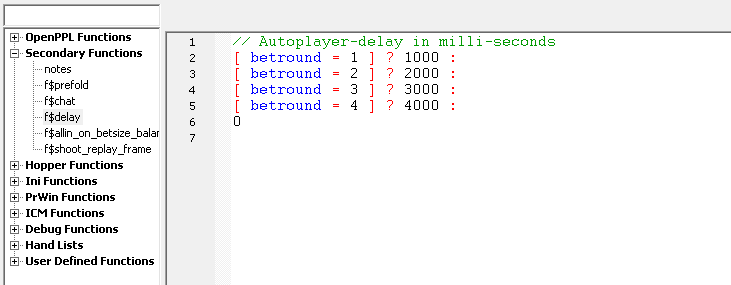
The function evaluates to the delay time in milliseconds.
An example of this might be: [ betround = 2 ] ? 2000 :
This function says to delay the Autoplayer’s action a two seconds on the flop (betround = 2 – flop, betround = 1 – preflop, betround = 3 – turn, betround = 4 – river).
For a random delay use the «random» symbol: [ betround = 2 ] ? (random*2000) :
This function says to randomly delay the Autoplayer’s action from zero to two seconds on the flop.
You can also adjust the delay depending on the pot size: [ betround > 1 ] && [ pot/bblind > 30 ] ? 3000 :
This line means that there will be a 3 seconds delay postflop if the pot size is more than 30bb.
The delay time when entering bets is set in the autoplayer settings Edit – Preferences – Autoplayer:
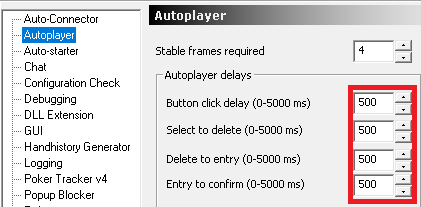
- Button click delay: This setting controls the delay (in milliseconds) between multpile button
clicks (double and triple clicks). - Select to delete: For betsize actions, this setting determines how long (in milliseconds) that
bot will pause after performing the betsize select action, and prior to performing the betsize
delete action. - Delete to entry: For betsize actions, this setting determines how long (in milliseconds) that
bot will pause after performing the betsize delete action, and prior to performing the betsize
entry action. - Entry to confirm: For betsize actions, this setting determines how long (in milliseconds) that
bot will pause after performing the betsize entry action, and prior to performing the betsize
confirm action.